Write-up
Bonjourr
Minimalist new tab extension with iOS-style backgrounds, quick links, notes and a Pomodoro timer.
Bonjourr replaces your new tab with a full-bleed photo, a clock and optional widgets. Here is what is free, open source, and where it falls short on mobile.
At a glance
- Type: browser extension that replaces the new tab page with a minimalist, iOS inspired screen (bonjourr.fr, read 2026-09-29)
- Pricing: free, with no account and no subscription; the developers accept optional Ko-fi donations (bonjourr.fr, read 2026-09-29)
- License: open source, GPL-3.0 (github.com/victrme/Bonjourr, read 2026-09-29)
- Install: Chrome Web Store, Firefox Add-ons, Microsoft Edge Add-ons (bonjourr.fr/docs, read 2026-09-29)
- Platforms: Chrome, Firefox and Edge as an extension; Safari through a manual homepage setting rather than an extension; also runs with no install at all as a hosted web page
- Links: bonjourr.fr · Documentation · Code
- Price
- $0 USD, checked (source)
Last checked
Screenshots
What it is and who it's for
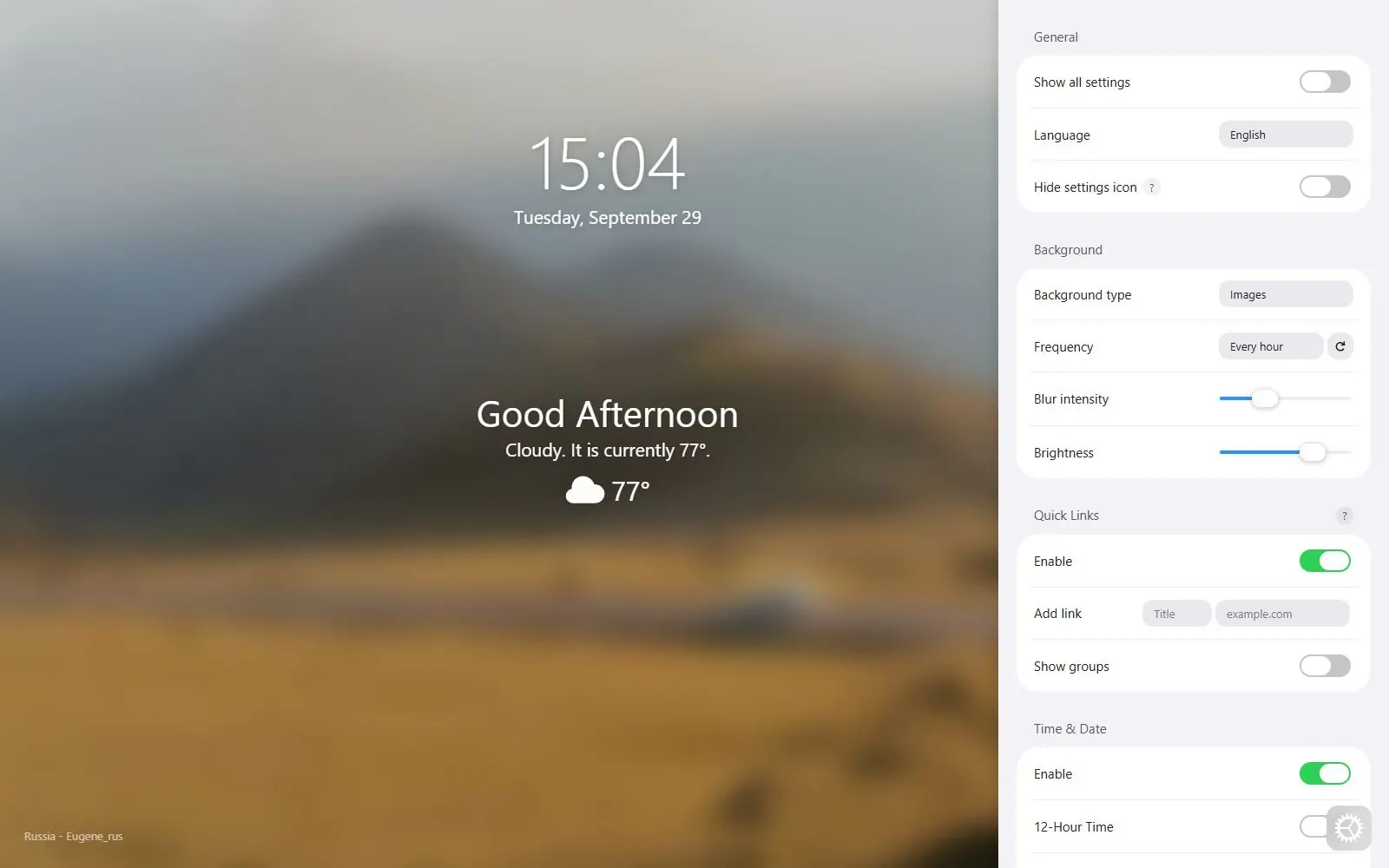
Bonjourr replaces your browser's new tab with a full-bleed photo that changes mood through the day, paired with a clock, a greeting, and whichever widgets you switch on: quick links, a search bar, notes, quotes and a Pomodoro timer. It's built by two independent developers, Victor Azevedo and Tahoe Beetschen, described on their own site as people "who love things well made and actually believe privacy matters" (bonjourr.fr, read 2026-09-29), not a company with a roadmap to answer to.
Nothing here needs an account. The homepage states plainly that you "can start using Bonjourr immediately, without needing to create or log into an account" (bonjourr.fr, read 2026-09-29), and there's also a hosted web version at online.bonjourr.fr for anyone who wants to try it, or use it, without installing anything.
This suits someone who wants a calm, private new tab and is willing to open a settings panel to turn features on rather than start from a busy default. It isn't built for a dense grid of live service widgets, and it has nothing for a homelab or server dashboard.
Features worth knowing
Backgrounds are, in the site's own words, "a manually curated collection of the best photos Unsplash has to offer," shifting mood from noon to the end of the night, with a stated policy of "no generative AI" behind them (bonjourr.fr, read 2026-09-29). Quick links work as bookmark tiles you can drag into folders; the search bar accepts any search engine you configure, including custom ones; notes support markdown and checkboxes for a basic to-do list.
The weather widget offers three ways to locate you. Approximate uses IP based geolocation and needs no permission at all. Precise is more accurate but asks for a location permission the docs describe as unreliable on some browsers, especially Safari. Manual just has you pick a city. An optional "Detailed weather" toggle links out to a weather provider's own site, and the docs are careful to say Bonjourr "is not affiliated with MSN, AccuWeather, Yahoo!, or Windy.com" (bonjourr.fr/docs/widgets/weather/, read 2026-09-29).
The Pomodoro timer, added in Bonjourr 22 (released December 2025), runs the standard technique: work sessions, short breaks, and a longer break every four rounds. It keeps counting even if you close the Bonjourr tab, though it won't ring without one open, and right-clicking the widget shows recent usage stats (bonjourr.fr/docs/widgets/pomodoro/, read 2026-09-29).
Because the whole project is open source, its GitHub repository is publicly inspectable: GPL-3.0 licensed, with 2,091 stars, 209 forks and 111 open issues as of this read (gh api, read 2026-09-29).
Getting started
Add Bonjourr from the Chrome Web Store, Firefox Add-ons or Microsoft Edge Add-ons, then accept your browser's own prompt to keep it as the new tab page. Brave can install the same Chrome build directly, since it's Chromium based. Safari on macOS has no extension at all; instead the docs walk through setting Safari's homepage and new tab to https://online.bonjourr.fr, because Bonjourr's own Safari App Store app (which had covered iOS and iPadOS too) was discontinued in May 2026 (bonjourr.fr/docs/, read 2026-09-29). Zen, Vivaldi, Opera and Orion each need their own extra setup step, documented on the same install page.
Mobile is the weakest path in. There's no way to install Bonjourr as an extension on Android, on either Chrome or Firefox. Some non-Safari iOS browsers, Firefox among them, let you set a custom new tab URL instead, which can point at online.bonjourr.fr (bonjourr.fr/docs/, read 2026-09-29).
Pricing (checked 2026-09-29)
Bonjourr is free, with no account, no subscription and no paid tier. Its own homepage puts it directly: "Since Bonjourr is free, respects your privacy and doesn't collect or sell your data, donations are the only way we're able to keep it running" (bonjourr.fr, read 2026-09-29). Donations run through Ko-fi, and the site says a current donor's name is added to Bonjourr itself the following month as thanks.
Limits and trade-offs
Both major browsers add their own identifying marks to an installed new tab extension, and Bonjourr can't fully remove either one. Chrome adds a footer to every extension based new tab that the docs describe as "not part of Bonjourr," removable only by right-clicking it each time you'd want it gone (bonjourr.fr/docs/, read 2026-09-29). Firefox adds a label reading "Extension (B...w Tab Page)" next to the search bar, which Bonjourr's own FAQ says has no easy toggle and can only be hidden by writing a custom userChrome.css rule yourself (bonjourr.fr/docs/reference/faq/, read 2026-09-29).
Mobile support is genuinely thin. Android has no extension path on either Chrome or Firefox, full stop, and the iOS and iPadOS Safari app that once brought Bonjourr to phones and tablets was discontinued in May 2026, leaving a third-party workaround app as the only route today (bonjourr.fr/docs/, read 2026-09-29).
New tabs also default to a browser's own native search bar focus rather than Bonjourr's, something the developers say they can't override since it happens before Bonjourr has loaded; the documented workaround is pressing Esc, then / (bonjourr.fr/docs/reference/faq/, read 2026-09-29).
Reach across the two main desktop stores is lopsided. As read today, the Chrome Web Store listing shows 400,000 users on version 22.3.0, while the separate Firefox listing shows 12,304 users on the same version (chromewebstore.google.com, addons.mozilla.org, both read 2026-09-29).
Alternatives
- Momentum, a similar photo and quote scene, but with a paid Plus tier for deeper weather, task manager integrations and tab groups.
- Infinity New Tab, built around icon folders and HD wallpapers instead of a single photo scene.
- Anori, open source too, with folders, widgets and a plugin system for building your own.
- Renewed Tab, also open source, with a resizable widget grid rather than a fixed scene.
- Start Page HQ, trades minimalism for a much larger widget catalog behind a paid Premium tier.
Questions people ask
How do I open a new tab extension in Chrome?
Install Bonjourr from the Chrome Web Store, then accept Chrome's own prompt to keep it as your new tab page. Chrome shows that prompt automatically the first time a new tab extension is installed, and no account or sign-in is needed either way.
What is the new tab URL?
Every browser has its own internal address for a blank new tab. Installing a new tab extension like Bonjourr overrides what loads at that address rather than changing the address itself, so an installed copy of Bonjourr is what appears instead of the browser's default page.
Sources
- bonjourr.fr, read 2026-09-29
- bonjourr.fr/docs, read 2026-09-29
- bonjourr.fr/docs/widgets/weather, read 2026-09-29
- bonjourr.fr/docs/widgets/pomodoro, read 2026-09-29
- bonjourr.fr/docs/reference/faq, read 2026-09-29
- github.com/victrme/Bonjourr, via
gh api repos/victrme/Bonjourr, read 2026-09-29 - github.com/victrme/Bonjourr/releases/latest, via
gh api, read 2026-09-29 - Chrome Web Store listing, read 2026-09-29
- Firefox Add-ons listing, read 2026-09-29
Last checked 2026-09-29.
Last checked