Write-up
CentPage
Start page and productivity dashboard with widgets and an ad-free premium tier.
CentPage replaces your new tab with bookmarks and widgets. Here is what the free tier caps, what Premium costs, and where it falls short.
At a glance
- Type: a start page and new tab replacement with a directory of curated sites and a catalog of 50-plus small widgets (centpage.com, read 2026-09-29)
- Pricing: free with widget and usage caps, or Premium from $2.99 a month, $24 a year, or $49 for a 2-year pass (centpage.com/pricing, read 2026-09-29)
- License: not confirmed. No license or source repository is stated anywhere on the site
- Install: use the website directly with no sign-up, or add the Chrome extension
- Platforms: Chrome, and any browser as a web page
- Links: centpage.com · Pricing · About
- Paid plans from
- $2.99 USD, checked (source)
Last checked
Screenshots
What it is and who it's for
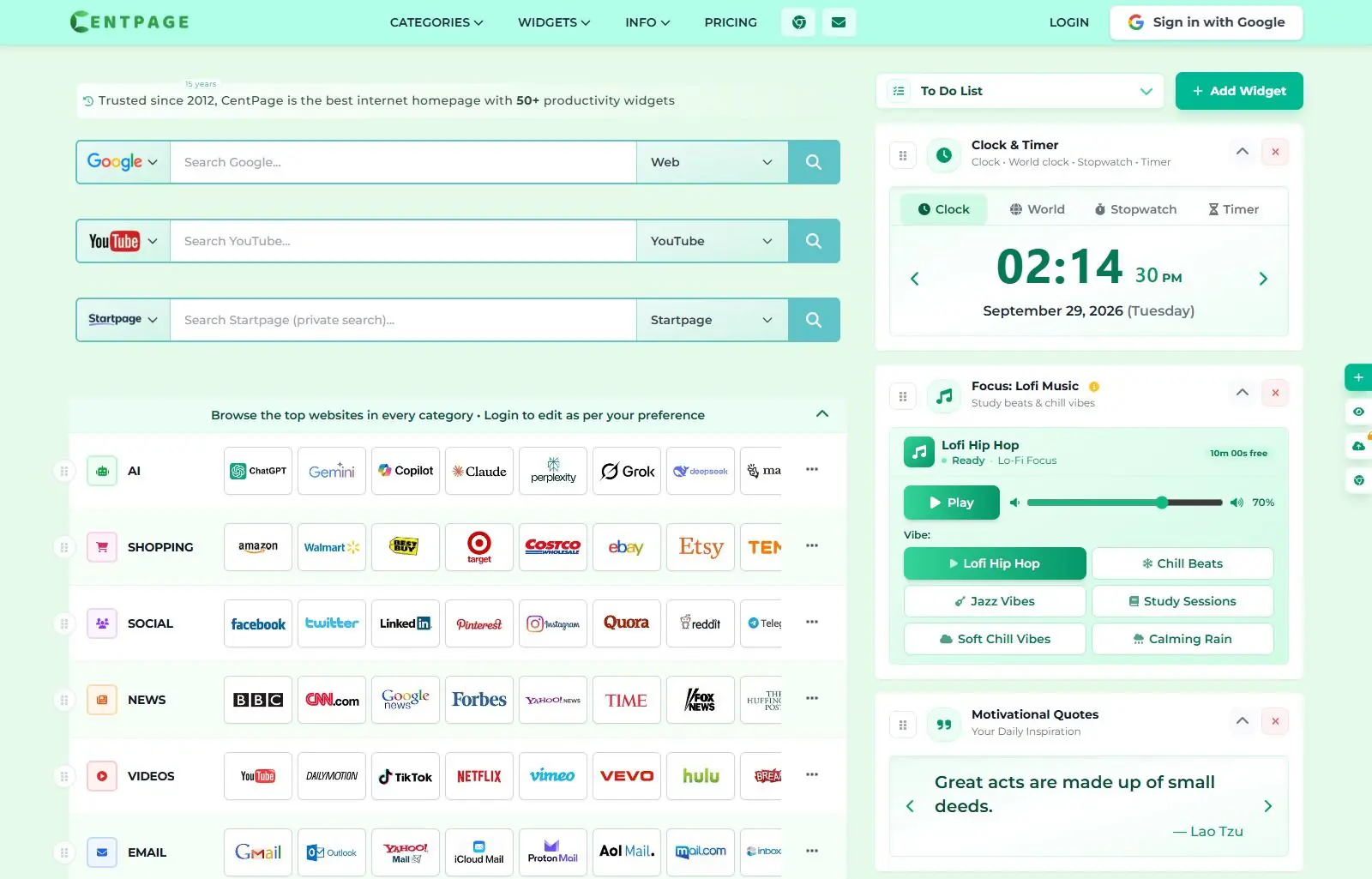
CentPage is a browser start page that's been running since 2012 (centpage.com/about, read 2026-09-29). Two things sit side by side on the same page: a directory of curated "top websites" grouped into 30-plus categories (social, news, AI, shopping and more), and a widget area you fill from a catalog of over 50 tools, including a to-do list, sticky notes, crypto prices and an astronomy picture of the day. You can browse and rearrange the whole thing without signing in; a Google account is only needed to keep your layout across devices.
It suits someone who wants one page combining bookmarks, a handful of small utilities and a general "what's out there" directory, rather than a narrower dashboard built around one job. It's a weaker fit if you already know exactly which sites you use and just want a fast, empty grid: CentPage's directory-and-widgets approach is closer to a browsable homepage than a minimal launcher.
Features worth knowing
The free tier gives you 20 of the widgets, chosen from categories including Productivity & Organization, Knowledge & News and Fun & Relaxation (centpage.com/tool/weather, read 2026-09-29; Chrome Web Store listing, read 2026-09-29). Widgets on the homepage read live without any setup: weather, crypto prices, air quality, a NASA astronomy picture dated to the day you load it, stock prices and a rotating YouTube feed, each showing live data when this page was read. A "Daily AI Tips & Tricks" widget and an AI Assistant & Chatbot both run through CentPage's own AI features rather than a separate account.
Beyond the widget grid, the category directory works as a browsable index: pages like /technology or /social list a curated set of sites in that space, with a login prompt only if you want to reorder or edit them. The Chrome extension folds the whole page into the new tab, and CentPage's own blog runs regular posts on browser productivity and start page setup, which double as an explainer for people new to the format.
Getting started
Go to centpage.com directly; the widget grid and category directory both work without creating an account. To make it your new tab page instead of a separate site, add the Chrome extension. Signing in, when you want your layout to follow you, is Google account only; there is no separate email and password option shown anywhere on the site.
Pricing
Checked 2026-09-29. Free costs nothing and needs no card, but it's capped: 20 widgets, 2 habits and 2 tasks a day, 3 logged expenses a month, 2 AI prompts a day, one custom bookmark table, and data kept in local storage only rather than synced anywhere. Monthly Premium is $2.99 a month. Yearly Premium is $24 a year, billed annually, which works out to about $2 a month. A 2-Year Pass is a one-time $49 payment covering two years of Premium. All three paid tiers unlock the same thing: every widget, unlimited notes, tasks, habits, links, expenses and RSS feeds, cloud sync and export, priority support and an ad-free layout (centpage.com/pricing, read 2026-09-29).
Limits and trade-offs
The free tier's caps are tight for a daily-use tool: two habits, two tasks and three expenses a month is little more than a demo of what the paid widgets can do, and free data lives in local storage only, so it doesn't follow you to a second computer without paying. Sign-in is Google only; there's no email and password account and no other identity provider, so anyone who avoids linking a Google account is limited to a single browser's local storage even on the free tier.
CentPage's own pages carry inconsistent claims about scale. Its about page states "10K+ Users," while its pricing page separately claims a different figure for how many people it's "trusted by." Both are the product's own unverified numbers rather than anything independently checked, which is why neither appears above. Category pages like /technology also reuse the site's default page title instead of a page-specific one, a plain on-page SEO gap for a site with 30-plus of them.
Alternatives
- Protopage, free with no paid tier found, built around widget-based tabs you can keep private, share publicly or protect with a password.
- start.me, capped at 3 pages on its free tier with ads, with a $25-a-year Personal PRO plan removing ads and the page cap.
- Symbaloo, a tile-based grid rather than a widget page, free with ads or $34.95 a year ad-free.
- MyKK, open source and free forever as a downloadable single HTML file, with a $3-a-year paid tier for live weather, RSS and stock widgets.
- Abunch, a link-first personal web desktop, free for 200 links or $2.49 a month for a larger, mostly-public setup.
Questions people ask
How do I change the new tab on my homepage?
Install the CentPage extension from the Chrome Web Store, which replaces the new tab page directly. You can also just set centpage.com as your browser's homepage without installing anything; the site itself needs no sign-in to use.
What is the best free dashboard app?
There is no single best pick. CentPage's own free tier caps out at 20 of its 50-plus widgets, with daily limits on habits, tasks and AI prompts and local-only storage. If those caps matter to you, start.me's free tier or Protopage's uncapped free plan are worth comparing before paying for CentPage Premium.
How do I find my homepage?
On CentPage, your homepage is whatever you've arranged on centpage.com: the widgets, categories and bookmark tables you've set up. Signing in with a Google account, the only sign-in option offered, keeps that layout tied to your account rather than just the browser you set it up in.
Sources
- centpage.com, read 2026-09-29
- centpage.com/pricing, read 2026-09-29
- centpage.com/about, read 2026-09-29
- centpage.com/tool/weather, read 2026-09-29
- Chrome Web Store listing, read 2026-09-29
- DashSuey product information (dashsuey.com), checked 2026-09-29
Last checked 2026-09-29.
Last checked