Write-up
Dashly
Hosted dashboard with bookmarks, weather, world clocks and to-do lists.
Dashly is a free hosted dashboard for bookmarks, notes, to-dos, weather and more. Here is what its free plan keeps forever, and what only paid plans unlock.
At a glance
- Type: hosted personal dashboard with widgets for bookmarks, notes, to-dos, weather and more (dashly.live, read 2026-09-29)
- Pricing: free forever on the Free plan, or Plus and Pro at planned rates of $4 and $9 a month once early access ends. Every plan is $0 right now (dashly.live/pricing, read 2026-09-29)
- License: proprietary. Its terms of service keep the platform's code, design and branding as the company's own property (dashly.live/terms, read 2026-09-29)
- Install: none. Dashly runs in a browser at dashly.live; there is no extension or app (dashly.live, read 2026-09-29)
- Platforms: web
- Links: dashly.live · Features · Pricing · Public demo
- Paid plans from
- $4 USD, checked (source)
Last checked
Screenshots
What it is and who it's for
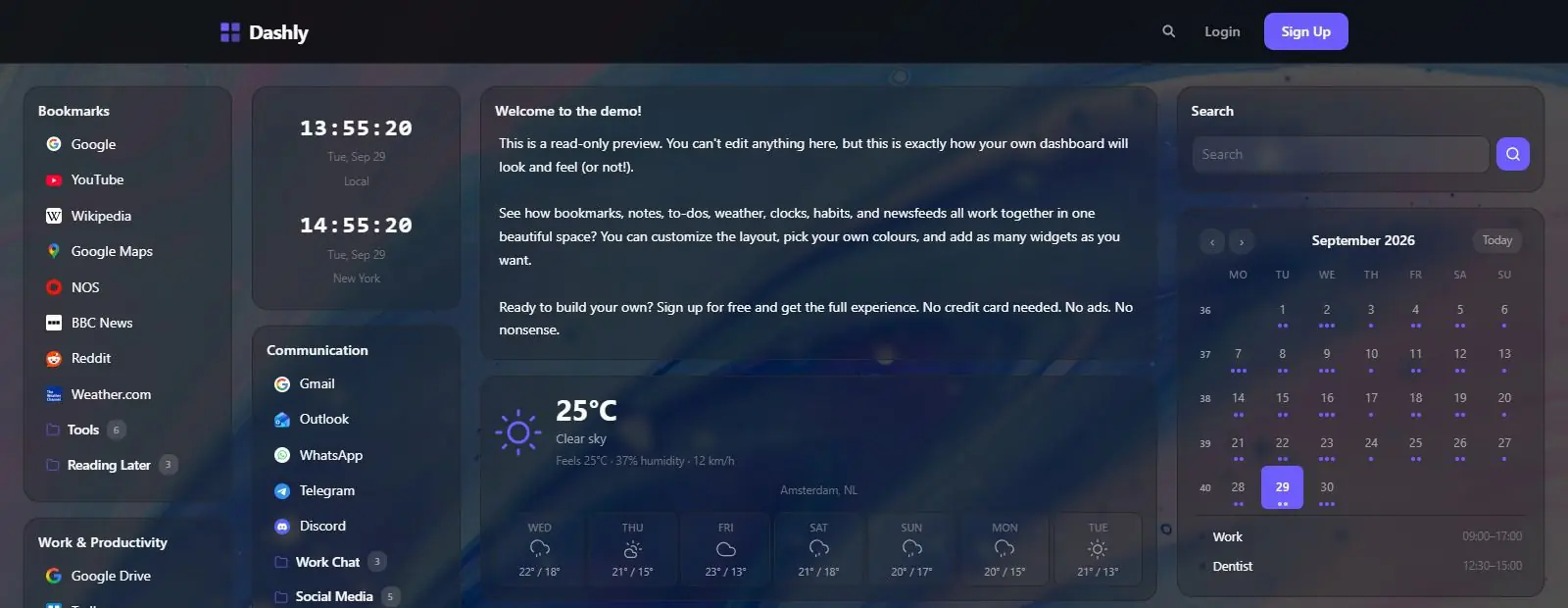
Dashly is a personal start page built around ten widgets: bookmarks, notes, a to-do list, world clocks, weather, habit tracking, RSS newsfeeds, a calendar, an embed box for any other webpage, and a Pomodoro timer (dashly.live/features, read 2026-09-29). It launched into what its own site calls early access, with every plan free while the company finishes the product and settles what it will eventually charge.
It suits someone who wants one page collecting the handful of things they check throughout the day: a bookmark shelf, a running to-do list, the weather, maybe a habit they are tracking, arranged and colored however they like. Its terms of service are governed by Dutch law, which points to Europe as the company's base, though no company name appears anywhere on the site itself (dashly.live/terms, read 2026-09-29).
Features worth knowing
Each widget on Dashly is its own self-contained tool, and a dashboard can hold as many as the plan allows. Bookmarks organizes links into folders and sub-folders with automatic favicons and instant search. Notes auto-saves as you type and can be locked read-only so it does not get edited by accident. To-Do handles checklists with optional deadlines. World Clocks shows any timezone in digital or analog style, and Weather pulls current conditions plus a multi-day forecast for any city, with metric or imperial units.
Habits tracks daily, weekly or monthly streaks that reset if a day is missed. Newsfeeds subscribes to RSS feeds from a built-in catalog or a pasted URL, with tabs for multiple feeds and pagination for long ones. Calendar reads ICS feeds from Google Calendar, Outlook or similar, in day, week, month or agenda view. Embed drops any webpage into a widget, useful for a Google Doc, a Notion page or anything else that fits in an iframe. Pomodoro Timer runs work and break intervals with session tracking, and keeps its place across page reloads (dashly.live/features, read 2026-09-29).
Layout is drag and drop, with one to five columns, adjustable widget height and gap, an HSV color picker for the accent color, four background styles, and a lock mode that freezes the layout against accidental edits. A dashboard can be made public with a link that anyone can view read-only, no account required, and that link can optionally be locked behind a password (dashly.live/features, read 2026-09-29).
Getting started
Sign up at dashly.live with no credit card required. The site says a first dashboard is ready to set up in under a minute, and every feature is available to try right away, since every plan is free during early access (dashly.live, read 2026-09-29).
Pricing (checked 2026-09-29)
The Free plan is described as free forever: one dashboard, up to 20 widgets, and five of the ten widget types, bookmarks, notes, to-do, world clocks and weather, plus a background gallery, accent colors and a plain shareable link. It does not include habit tracking, newsfeeds, the calendar widget, custom background uploads or password-protected sharing.
Plus is priced at $4 a month once early access ends, and adds up to five dashboards, unlimited widgets, all ten widget types, custom background uploads, and shareable links that can be password protected. Pro is priced at $9 a month once early access ends, and adds unlimited dashboards, priority support and early access to new features on top of everything in Plus. Right now, both cost $0, and the pricing page says early access sign-ups get "grandfathered pricing" once real billing starts, though no start date is given (dashly.live/pricing, read 2026-09-29).
Dashly's own pricing FAQ adds a wrinkle: none of the plan limits above are enforced yet. Anyone on any plan can currently create unlimited dashboards, widgets, bookmarks, notes, to-dos and habits, regardless of which tier they are nominally on (dashly.live/pricing, read 2026-09-29).
Limits and trade-offs
There is no data export tool yet. The pricing FAQ says export functionality is still being built, and in the meantime a shared dashboard link is the only way to hand someone a read-only copy of what is on it (dashly.live/pricing, read 2026-09-29). Account deletion is immediate and final: the same FAQ says everything, widgets, dashboards and uploaded backgrounds, is permanently deleted with no recovery afterward.
The product is young enough that its own pricing caps are not enforced today, which is convenient while it lasts but leaves an open question about how a heavily loaded Free-plan dashboard gets treated once the 1-dashboard, 20-widget limit actually starts to apply. There is no changelog, version number or blog post documenting what has shipped or when. It is closed source, with no self-hosted option, and runs only in a browser; there is no dedicated mobile app.
Alternatives
- Single Dashboard (singledashboard.com), aimed at multi-monitor desks, wall screens and TVs, with no free plan and pricing that starts well above Dashly's.
- Family Dashboard (familylife.space), free, built for a household's shared schedule rather than one person's bookmarks and to-dos.
- Protopage (protopage.com), a free widget-based start page with private, public or password-shared tabs.
- start.me (start.me), a bookmark-first start page with a free tier and a paid tier that unlocks more widgets and removes ads.
Questions people ask
What is a personal dashboard?
A personal dashboard is a single page that gathers the things one person checks often, bookmarks, notes, a to-do list, the weather, into one customizable view instead of several browser tabs. Dashly builds that idea around ten widget types on a page you arrange yourself.
How can I create my own dashboard for free?
Sign up at dashly.live with no credit card. The Free plan is free forever and covers bookmarks, notes, a to-do list, world clocks and weather across one dashboard, up to 20 widgets.
What is the best free dashboard app?
There is no single best pick. Dashly's own niche is a small bundle of everyday widgets, bookmarks, notes, a to-do list, world clocks and weather, on a page that stays free forever at the Free tier. The habit tracker, calendar and newsfeed widgets currently sit behind its paid plans, though nothing is actually billed while early access lasts.
Sources
- dashly.live, read 2026-09-29
- dashly.live/features, read 2026-09-29
- dashly.live/pricing, read 2026-09-29
- dashly.live/terms, read 2026-09-29
- DashSuey product information (dashsuey.com), checked 2026-09-29
Last checked 2026-09-29.
Last checked