Write-up
Protopage
Widget-based start page with private, public or password-shared tabs and categories.
Protopage turns a blank browser tab into a grid of bookmarks, news and weather widgets you arrange yourself. Here is how it works and where it's thin.
At a glance
- Type: hosted personal start page, live at protopage.com (protopage.com, read 2026-09-29)
- Pricing: free; no pricing or premium page found (protopage.com/premium, protopage.com/pricing, both read 2026-09-29)
- License: closed source. Its terms name Protopage Ltd as the operator and copyright holder, and state no open source license (protopage.com/web/terms.html, read 2026-09-29)
- Install: none required. It runs in any browser at protopage.com, with no account required to start. An optional Chrome extension from Protopage Ltd gives quick access to your page and adds bookmarks and news feeds from the site you are on (Chrome Web Store, read 2026-09-29)
- Platforms: web, plus the Chrome extension
- Links: protopage.com · blog
- Price
- $0 USD, checked (source)
Last checked
Screenshots
What it is and who it's for
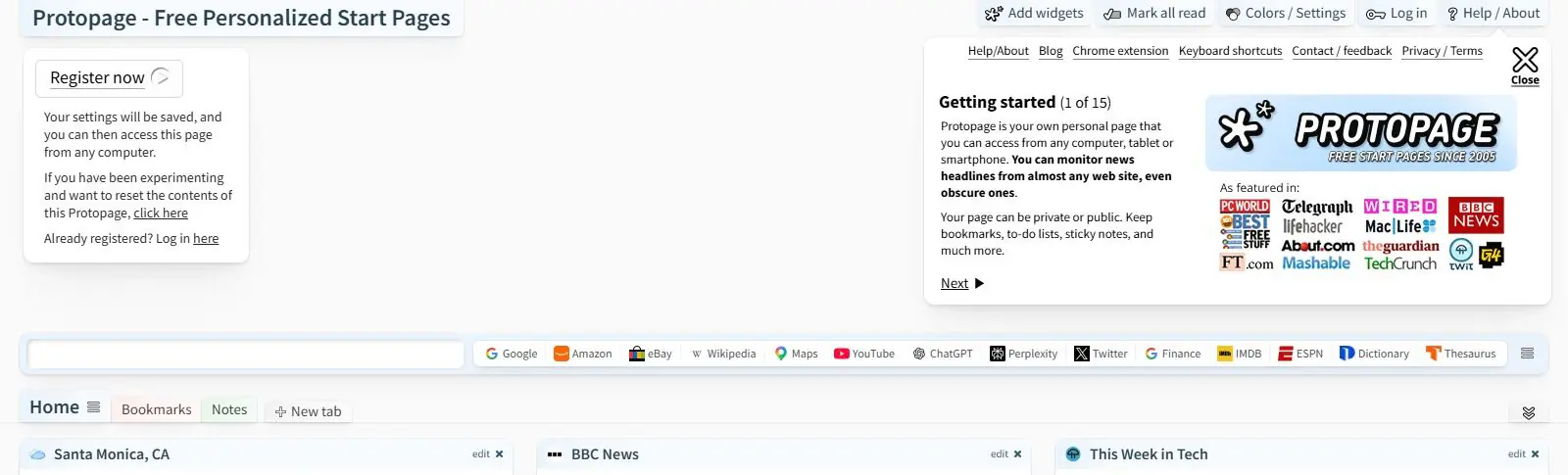
Protopage's homepage is the product. There is no separate marketing page: land on https://www.protopage.com and a working start page is already there, filled with a default set of bookmark tiles (Google, Amazon, Wikipedia and similar), a couple of news widgets, and a weather tile, all editable on the spot with no sign-up wall (read 2026-09-29). Widgets sit in columns you can drag, resize and remove, and you can add more from what its own onboarding tour calls "thousands of different widgets."
The blog's own archive stretches back to a first post in December 2005, around the same time Google's iGoogle launched, and the two products shared the same basic pitch: a personalized, widget-based homepage instead of a search box (source: blog.protopage.com, read 2026-09-29; see the FAQ below on iGoogle). Protopage is still one of the few start pages from that era still running.
It suits someone who wants to try a widget-based homepage without committing to an account first, and who might want to share a page later, whether that means making it fully public at a personal URL or handing out a password that lets someone view it without editing it. It is not built for teams, and there is no sign of a business or shared-workspace tier anywhere on the site.
Features worth knowing
Tabs organize your widgets, and tabs can be grouped into categories with their own sharing setting: private, public, or restricted behind a "view only" or "view and edit" password, set from an advanced category panel (source: protopage.com onboarding tour, read 2026-09-29). A page made public is reachable at protopage.com/yourname for anyone to view, though only the owner can edit it.
The widget catalog is broad rather than narrowly listed: the tour names bookmarks, to-do lists, sticky notes, a weather widget you set to your own city, calendars, photos, and news widgets that can pull headlines from "almost any web site, even obscure ones" through RSS. A registered page also gets a mobile-formatted version at protopage.com/mobile.
One feature stands out: a "Web widget code" widget that runs whatever self-contained HTML and CSS you paste into it. A December 2024 blog post walks through prompting an AI assistant, using Claude.ai as its own example, to write that HTML for you, then pasting the result straight into the widget. The same post is upfront about the catch: browser security stops a pasted widget from calling out to another website, so the trick only works for things that do not need live data, like a countdown timer or a small game, not a real news feed or stock ticker (source: blog.protopage.com, read 2026-09-29).
Getting started
Nothing needs installing or signing up first. Open https://www.protopage.com and edit the default page directly: add widgets from the "Add widgets" menu, drag them into place, and click "edit" on any widget that has settings, such as typing your city into the weather widget. When you are ready to keep that page, click "Register now" to create a free account; the site's own copy says this is so "your settings will be saved," and lets you reach the same page from any other computer, tablet or phone afterward (read 2026-09-29).
Pricing (checked 2026-09-29)
Protopage does not appear to charge for anything. Its own title tag reads "Free Personalized Start Pages," and the two paths a paid tier would normally sit at, /premium and /pricing, both return the site's own not-found page rather than a plan list. Nothing else on the site names a subscription, a widget cap, or a locked feature.
Limits and trade-offs
The privacy policy is easy to miss. /privacy returns the site's not-found page, and the policy itself sits at protopage.com/web/privacy.html, reached from a "Privacy / Terms" link in the getting-started panel. It says Protopage Ltd may use account information to personalize advertising and to give advertisers information about its user base and usage patterns (protopage.com/web/privacy.html, read 2026-09-29). The blog's cadence has slowed a great deal: its newest post is dated January 5, 2025, about 20 months before this write-up's read date, and even Protopage's own 20-year archive shows repeated year-plus gaps between updates, so there is no changelog to check the product's current pace against. The custom-widget trick only covers self-contained content, since a pasted widget cannot fetch live data from another site. And what the tour calls a "mobile version" is a reformatted web page at protopage.com/mobile, not a listed app in either app store.
Alternatives
- start.me, a bookmark manager first, with a paid PRO tier that adds more widgets and drops the ads.
- Symbaloo, a tile-based visual grid for bookmarks rather than a widget board.
- igHome, another direct descendant of the iGoogle style, also free.
- Kadaza, thinner on widgets, closer to a directory of popular sites with a background picker.
Questions people ask
How do I find my homepage?
If you mean a website you want to open every time you start your browser, most browsers have a homepage or start-page setting under their own settings menu, where you paste in a URL. Protopage's own address, https://www.protopage.com, works there like any other. Once it is set, registering a free Protopage account keeps the same tabs and widgets in place the next time you open a different computer.
What is iGoogle?
iGoogle was Google's own customizable homepage, launched in May 2005 and shut down on November 1, 2013, after the company decided the need for it had faded. Protopage's earliest blog post dates to December 2005, the same period, and it is one of the small number of similar widget-based start pages still running today with roughly the same idea: a grid of tiles you arrange yourself.
How can I create my own dashboard for free?
With Protopage, there is nothing to pay and nothing to install. Visiting the site hands you a working page immediately, already populated with sample bookmarks, news and weather widgets that you can edit, remove or replace. Registering an account, which costs nothing, lets that same page follow you to your next computer or phone.
Sources
- protopage.com, read 2026-09-29
- protopage.com/premium, read 2026-09-29
- protopage.com/pricing, read 2026-09-29
- protopage.com/privacy, read 2026-09-29
- protopage.com/web/privacy.html, read 2026-09-29
- protopage.com/web/terms.html, read 2026-09-29
- Chrome Web Store: Protopage Start Page, read 2026-09-29
- blog.protopage.com, read 2026-09-29
- Wikipedia: iGoogle, read 2026-09-29
- DashSuey product information (dashsuey.com), checked 2026-09-29
Last checked 2026-09-29.
Last checked