Write-up
Anori: an open source new tab extension
Open source new tab extension with folders, widgets and custom themes.
Anori replaces your new tab with widgets you arrange in folders. Here is what is free, how its permissions work, and where the project falls short.
At a glance
- Type: browser extension that replaces the new tab page (anori.app, read 2026-09-29)
- Pricing: free, with no paid tier; development runs on optional donations (anori.app, read 2026-09-29)
- License: open source under AGPL-3.0 (github.com/OlegWock/anori, read 2026-09-29)
- Install: Chrome Web Store, Firefox Add-ons, Microsoft Edge Add-ons (README.md, read 2026-09-29)
- Platforms: Chrome and other Chromium browsers, Firefox, and Edge (anori.app, read 2026-09-29)
- Links: anori.app · GitHub · Privacy practices
- Price
- $0 USD, checked (source)
Last checked
Screenshots
What it is and who it's for
Anori is a browser extension that replaces the new tab page with a grid of widgets you place yourself. It is built by a solo developer working under the handle OlegWock, who credits Ukraine and Poland in the site's own footer, with outside help on GitHub: the repository had 20 contributors, 487 stars and 69 forks as of this read, and its newest release, v2.2.0, went out on September 28, 2026 (anori.app, github.com/OlegWock/anori, both read 2026-09-29).
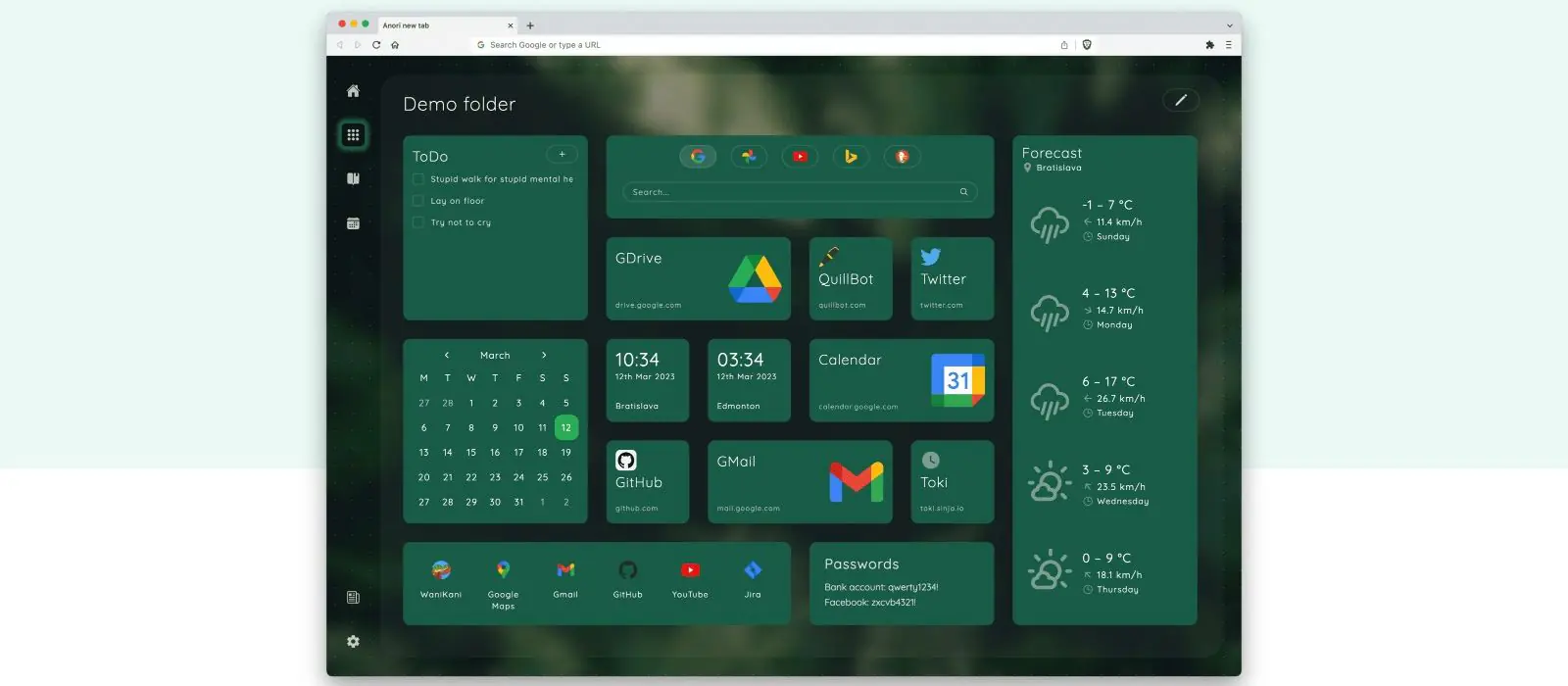
Widgets live inside folders, so a person can keep a work set separate from a personal one instead of scrolling one long page. It suits someone who wants to assemble their own new tab from a fairly technical widget set: an RSS reader, a calculator, CPU and RAM load, an Anki review counter, alongside the calendar and bookmarks widgets more common to the category.
Choosing Anori means accepting a smaller install base than Momentum or Infinity New Tab, in exchange for open code and narrow permissions. It is not built for someone who wants a single photo and quote scene with nothing to configure; Bonjourr or Momentum fit that habit better.
Features worth knowing
The project's own README lists 16 widgets: bookmarks and bookmark groups, an embedded page, world time, an RSS reader, notes, tasks, a calculator, weather, a calendar, recently closed tabs, tab stash, tabs on other devices, top sites, CPU and RAM load (Chrome only), pictures, and an Anki integration (README.md, read 2026-09-29). The homepage's own marketing copy still describes "12 built-in widgets." That number predates a commit in the repository's recent history titled "Add Tab stash and Synced tabs widgets," so the fuller list above is what the current release actually ships (anori.app, github.com/OlegWock/anori, both read 2026-09-29).
There are 8 pre-built color themes, plus the option to build a custom one. Permissions are scoped per widget rather than requested up front: Anori ships with a small default set (background alarms, isolated extension storage, closed-tab access that withholds page titles and URLs) and only asks for wider permissions, such as full browsing history or bookmark access, once a widget that needs them is added (anori.app/privacy, read 2026-09-29). The weather widget calls Open-Meteo for geocoding and forecasts, and an optional onboarding step calls ipinfo.io once to prefill location and time zone (anori.app/privacy, read 2026-09-29).
Anonymous usage analytics exist but sit off by default. Turning them on sends event and configuration data to PostHog and Amplitude under a random per-user ID, alongside an IP address, and the same page states the data is not sold or passed on elsewhere (anori.app/privacy, read 2026-09-29).
Getting started
Install it from the Chrome Web Store for Chrome or another Chromium browser, from Firefox Add-ons for Firefox, or from Microsoft Edge Add-ons for Edge (README.md, microsoftedge.microsoft.com, both read 2026-09-29). After installing, accept the browser's own prompt to set it as the new tab page. Onboarding then offers a quick default setup or a manual one; picking the quick setup is what triggers the one-time ipinfo.io lookup described above. No account or sign-in exists anywhere in the product.
Building it from source is documented too: clone the repository, install dependencies with pnpm, then run pnpm dev for a Chrome build or pnpm dev:ff for Firefox (README.md, read 2026-09-29).
Pricing (checked 2026-09-29)
Anori has no price and no in-app purchase in any of its three store listings. The only monetary ask is a donation link on a separate page, described as accepting card or cryptocurrency payments, which supports the developer rather than unlocking anything inside the extension (anori.app, read 2026-09-29).
Limits and trade-offs
The license changed partway through the project's life. Code up to a named commit in the repository's history was distributed under MIT; everything since is AGPL-3.0, so a copy taken from an old fork or an old release could carry different terms than the current source (github.com/OlegWock/anori, read 2026-09-29).
Contribution is narrow by design: the project takes pull requests only for bug fixes and translations, and a new feature has to start as a GitHub issue for discussion before any code gets written (README.md, read 2026-09-29).
Install numbers are modest next to the bigger names in this category. As of this read, the Chrome Web Store listed 30,000 users, Microsoft Edge Add-ons listed 2,491, and Firefox Add-ons listed 423 (chrome.google.com, microsoftedge.microsoft.com, addons.mozilla.org, all read 2026-09-29). The CPU and RAM widgets work only on Chrome and other Chromium browsers; Firefox does not expose the system APIs they rely on (anori.app/privacy, read 2026-09-29).
Alternatives
- Momentum, closed source, built around a single photo, quote and to-do scene rather than a widget grid.
- Bonjourr, also open source, with an iOS-style background and a narrower widget set aimed at simplicity.
- Infinity New Tab, built around icon folders and HD wallpapers, with a much larger install base.
- Renewed Tab, another open source pick, with a resizable widget grid and rotating backgrounds.
- Tab Widgets, which adds AI chat and smart home control instead of Anori's developer and study-leaning tools.
Questions people ask
What is the best new tab extension for Chrome?
There is no single best pick. Anori's own angle is an open source widget grid organized into folders, with permissions requested one widget at a time rather than all at once. If you want a single photo and quote scene instead of a grid to configure, Momentum or Bonjourr fit that habit better.
Is Anori free?
Yes. There is no paid tier or in-app purchase in the Chrome, Firefox or Edge listing. Development is funded through optional donations on a separate page.
How do I get Chrome tabs back to normal?
Remove Anori from chrome://extensions, or the equivalent extension manager in Firefox or Edge. The browser's own default new tab returns as soon as the extension is gone.
Sources
- anori.app, read 2026-09-29
- anori.app/privacy, read 2026-09-29
- github.com/OlegWock/anori, via
gh api repos/OlegWock/anori, read 2026-09-29 - README.md, read 2026-09-29
- Chrome Web Store listing, read 2026-09-29
- Firefox Add-ons listing, read 2026-09-29
- Microsoft Edge Add-ons listing, read 2026-09-29
- DashSuey product information (dashsuey.com), checked 2026-09-29
Last checked 2026-09-29.