Write-up
PresentBoard: a new tab dashboard for live data widgets
New tab extension with live widgets for calendar, stocks, weather and Google Photos.
PresentBoard replaces your new tab with widgets for live data, calendars and stocks. Here is what Starter covers and what Power User adds.
At a glance
- Type: Chrome extension that replaces the new tab page with a widget dashboard (presentboard.app, read 2026-10-24)
- Pricing: Starter is free forever; Power User is $2.99 a month billed monthly, with an annual option marketed as a 33% saving (presentboard.app/pricing, read 2026-10-24)
- License: proprietary. The terms of service name the developer as NU MEDIA s.r.o and forbid copying, redistributing or reverse engineering the site's materials (presentboard.app/terms-of-service, read 2026-10-24)
- Install: Chrome Web Store only; no Firefox, Edge or Safari listing found (chromewebstore.google.com, read 2026-10-24)
- Platforms: Chrome, with a marketing claim that the dashboard also displays well on tablets, phones and smart TVs (presentboard.app/dashboard-app, read 2026-10-24)
- Links: presentboard.app · Pricing · Widgets · Chrome Web Store
- Paid plans from
- $2.99 USD, checked (source)
Last checked
Screenshots
What it is and who it's for
PresentBoard is a Chrome new tab extension made by NU MEDIA s.r.o, a developer based in Slovakia going by the site's own governing-law clause (terms-of-service, read 2026-10-24). Rather than one fixed layout, it gives you a grid of widgets you place and resize yourself, with a public gallery of cloneable example dashboards (calendars, coffee-shop themes, a financial layout, a world-news layout) to start from instead of a blank page (presentboard.app, read 2026-10-24).
Its own pitch leans on reach across devices: "Works on mobile, tablet, PC, and even Smart TVs" (presentboard.app/dashboard-app, read 2026-10-24). That claim is about the dashboard's responsive layout, not a native app. The product itself installs only as a Chrome extension, so on a tablet, phone or TV you'd be opening the same web dashboard in a browser rather than replacing that device's own new tab.
The audience is someone who wants their new tab to do more than show a photo and a to-do list. Widgets can pull from live public data (a financial chart, an embedded video) or a person's own private data (a synced calendar, a spreadsheet rendered as a chart or table, a Google Analytics summary), which is a wider remit than most new tab extensions in this category attempt.
Features worth knowing
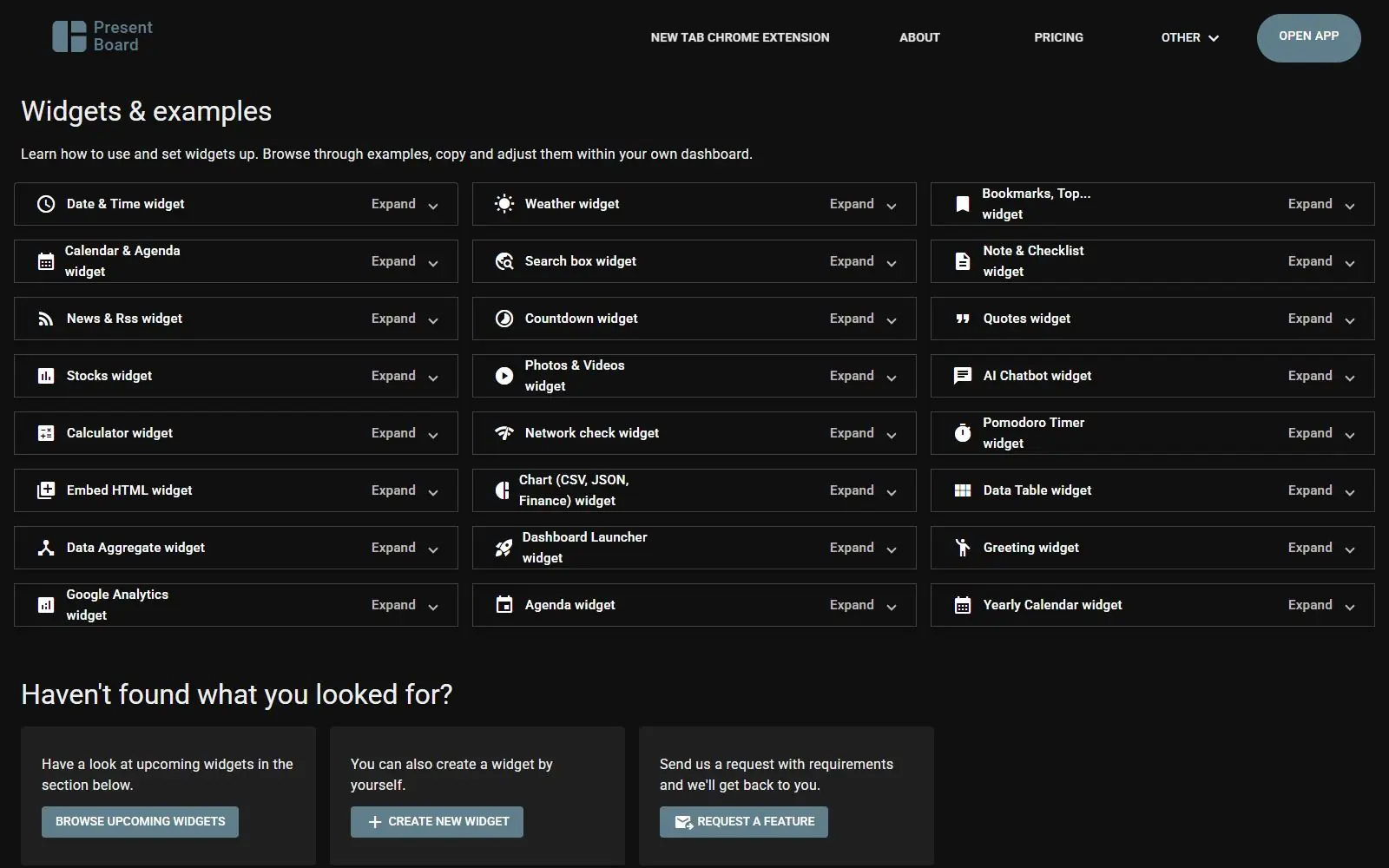
The widgets page lists 24 widgets: Date & Time, Weather, Bookmarks & Top Sites, Calendar & Agenda, Search box, Note & Checklist, News & RSS, Countdown, Quotes, Stocks, Photos & Videos, AI Chatbot, Calculator, Network check, Pomodoro Timer, Embed HTML, Chart (CSV, JSON or Finance data), Data Table, Data Aggregate, Dashboard Launcher, Greeting, Google Analytics, Agenda and Yearly Calendar (presentboard.app/widgets, read 2026-10-24). The Chart, Data Table and Data Aggregate widgets are the more unusual entries: they read a person's own CSV, JSON or XML feed, or aggregate a spreadsheet into one summary number, rather than only showing pre-built data types.
Layout options go beyond a plain grid. A changelog entry for version 2.1.0 added Base Designs (Default, Glassmorphism and Ink & Paper for everyone, plus Neon, Matrix and Retro for Power User) along with custom fonts and full color overrides, and version 2.1.4 added a Calculator widget with a pinned-history mode and a Pomodoro widget that keeps its timer running across dashboard switches (presentboard.app/widgets, read 2026-10-24). Feature requests are handled through a public roadmap: anyone can upvote a request, and the entry with the most votes is picked for development roughly every six weeks.
Getting started
Add PresentBoard from the Chrome Web Store. The listing states it needs only the "replace new tab" permission, and Starter works without creating an account (chromewebstore.google.com, read 2026-10-24). Signing in later is what turns on cloud backup, so a dashboard survives a browser reset or carries over to another computer.
Pricing (checked 2026-10-24)
Starter is free forever and includes the full core widget library plus cloud backup that syncs dashboards across devices. Power User is $2.99 a month billed monthly, and unlocks every widget and power feature: unlimited dashboards and widgets, no ads, the AI Chatbot and Custom Quotes widgets, premium API access, faster data refresh, and 50 monthly votes on the public roadmap instead of Starter's smaller allotment. The pricing page also shows a toggle for annual billing advertised as a 33% saving over the monthly rate, but does not state the resulting annual total anywhere on the page (presentboard.app/pricing, read 2026-10-24).
Limits and trade-offs
It ships only as a Chrome extension. No Firefox, Edge or Safari listing turned up in this check, which rules it out for anyone not using Chrome as their main browser.
The user base is small next to the category's bigger names: 10,000 Chrome users and 43 ratings at a 4.3 average, well under Momentum, Infinity New Tab or Bonjourr's few-hundred-thousand-user counts (chromewebstore.google.com, read 2026-10-24).
It's closed source, and the terms of service explicitly forbid decompiling, reverse engineering or redistributing the site's materials, with disputes governed by Slovakia's courts (terms-of-service, read 2026-10-24). The live-data features that set it apart, CSV and JSON feeds, Google Analytics, custom aggregation, take real setup effort. Someone who just wants a clock, a quote and a photo has simpler, calmer options elsewhere in this category.
Alternatives
- Momentum, a single photo-and-quote scene rather than a wide widget grid, with a much larger user base.
- Tab Widgets, another broad widget set, spanning tasks, markets, AI chat and smart home control.
- Awesome New Tab Page, a drag-and-drop tile grid for shortcuts, weather and crypto prices, free with no Power User tier.
- Bonjourr, minimalist and open source, built around backgrounds and quick links instead of live data widgets.
- Anori, open source with folders and a plugin system, smaller than PresentBoard's widget catalog but auditable.
Questions people ask
What is the best new tab extension for Chrome?
There is no single best pick. PresentBoard's own niche is a fuller dashboard than most new tab extensions attempt: live external data feeds, private spreadsheet syncing and a Google Analytics widget, on top of the usual clock, weather and to-do basics. If you want a single calm scene instead of a wide widget grid, Momentum or Bonjourr fit that habit better.
How do I change the new tab on my homepage?
Install PresentBoard from the Chrome Web Store, then accept Chrome's own prompt to keep it as your new tab page. Starter needs no account to start.
How to get Chrome tabs back to normal?
Remove PresentBoard from chrome://extensions. Chrome's own default new tab page returns as soon as the extension is gone.
Sources
- presentboard.app, read 2026-10-24
- presentboard.app/pricing, read 2026-10-24
- presentboard.app/widgets, read 2026-10-24
- presentboard.app/dashboard-app, read 2026-10-24
- presentboard.app/terms-of-service, read 2026-10-24
- Chrome Web Store listing, read 2026-10-24
- DashSuey product information (dashsuey.com), checked 2026-10-24
Last checked 2026-10-24.