Write-up
Abunch
Personal web desktop organizing links into public or private categories.
Abunch is a free personal homepage with a paid Standard tier. Here is what the free plan covers, what Standard adds, and where the product draws the line.
At a glance
- Type: hosted personal start page organizing links into named categories, built and run independently with no outside investors (abunch.io/about, read 2026-09-29)
- Pricing: free for 20 categories and 200 links, or Standard at $2.49 a month or $19.90 a year for a second desktop and higher limits (abunch.io/pricing, read 2026-09-29)
- License: proprietary, "All rights reserved" per the site's own footer (abunch.io, read 2026-09-29)
- Install: works in any browser at abunch.io, with an optional Chrome extension that only sets it as the browser's start page
- Platforms: web, with a Chrome extension
- Links: abunch.io · features · example board · pricing
- Paid plans from
- $19.90 USD, checked (source)
Last checked
Screenshots
What it is and who it's for
Abunch calls itself "your personal web desktop": one page of the sites you actually use, grouped into categories you name yourself, in place of a search bar or a crowded bookmarks bar. Its own pitch draws a direct line against the browser's own new tab page: "How many shortcuts can Chrome's new tab page hold? Around ten, and they're chosen for you based on what you visit most. That works if you live in ten sites" (abunch.io/example, read 2026-09-29). Past that number, the product's bet is that a page you built yourself beats one Chrome curates for you.
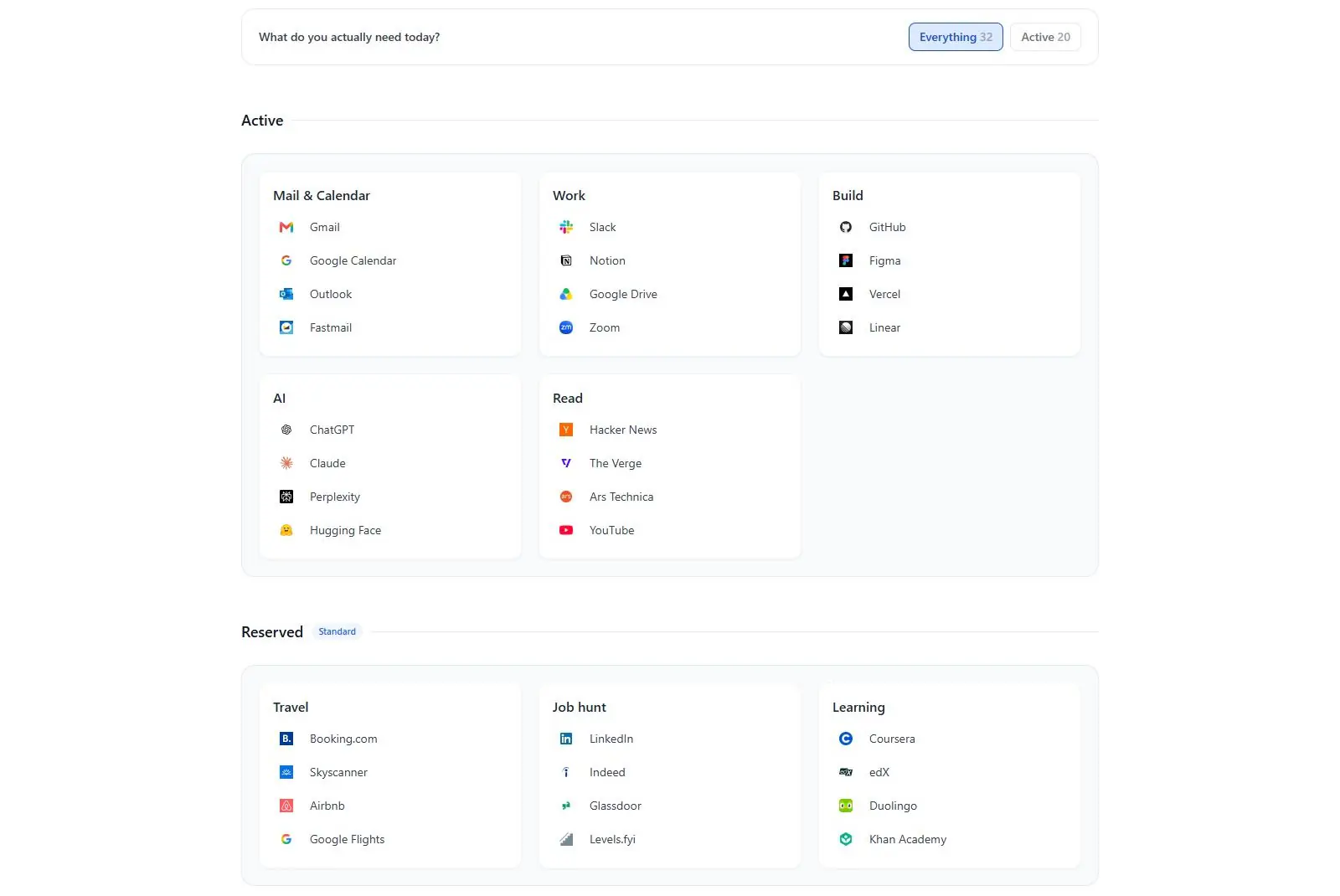
The core idea is two separate desktops. Active holds what you open most days; Reserved holds sites you need for weeks at a time and then not again, a house search, a job hunt, a course you are partway through, kept one click away instead of cluttering the daily view or getting deleted outright (abunch.io/example, read 2026-09-29). It suits someone who has outgrown a browser's built-in shortcuts and bookmarks bar but does not want a page of live widgets to maintain. It is a weaker fit for anyone who does want weather, an RSS feed or notes on the same page: the product's own FAQ answers that plainly. "Is there a weather widget, a feed reader, or notes? No. This is a page for getting to the sites you use, and every widget on it would be one more thing between you and them" (abunch.io/example, read 2026-09-29).
Abunch is run independently. Its About page states it has "no investors, no parent company, and no advertisers," and that Standard subscriptions fund running the product for everyone, free accounts included (abunch.io/about, read 2026-09-29).
Features worth knowing
A board is built from named categories holding links; both categories and the links inside them reorder by drag and drop, and adding a link fills in its title, icon and description automatically. Selecting several categories at once lets you delete or, on Standard, move them into the Reserved desktop in a single action rather than one at a time (abunch.io/features, read 2026-09-29). A find-in-tab search surfaces matches as you type, useful once a board holds more than a handful of categories.
Getting started does not mean starting from a blank page. A starter pack fills the first board at signup, and Explore holds hand-picked collections by topic (design, development, AI tools and more) that copy onto your own board in one click; browsing Explore does not require an account, though a guest sees only part of the collection list (abunch.io/features, abunch.io/example, read 2026-09-29). Publishing one of your own categories to Explore runs it through a phishing and malware check backed by Google, which the product's own docs describe honestly as imperfect: "it can miss a risky site or flag a safe one" (abunch.io/features, read 2026-09-29).
Bringing links in is limited to two paths: importing the bookmarks file a browser exports, or migrating directly from Start.me. Folders become categories, and anything outside a folder lands in an Unsorted category rather than going missing. Export works the other way on every plan, including free, as a JSON file (abunch.io/features, abunch.io/about, read 2026-09-29). The Chrome extension changes exactly one setting, the page your browser opens to, and asks for no site permissions at all: no new tab override, no search override, no home button override (abunch.io/example, read 2026-09-29).
Getting started
Sign up free at abunch.io, no card required, and pick a starter pack so the board arrives already filled rather than empty. You can also try Abunch before creating an account: a board you build without signing in stays in that browser as a temporary copy, and carries over to your account as it was once you do sign up (abunch.io/example, read 2026-09-29). Installing the Chrome extension afterward is optional; without it, the site itself walks you through setting the board as your browser's start page by hand.
Pricing (checked 2026-09-29)
Free covers 20 categories, 200 links total, and one public category, with no Reserved desktop and no time limit on the plan itself. Standard is $2.49 billed monthly or $19.90 billed yearly, a saving of about a third over paying month to month, and raises the ceiling to 200 categories and 2,000 links, unlocks the Reserved desktop, and allows up to 100 public categories instead of one. Downgrading from Standard does not delete anything over the new limit; editing is paused on what no longer fits until you're back within it (abunch.io/pricing, read 2026-09-29).
Limits and trade-offs
Abunch is deliberately not a widget dashboard. There is no weather tile, no RSS reader and no notes, by the product's own design rather than an oversight, so it does not compete with products built around live data. Importing is narrow too: the only supported paths are a browser's own bookmarks export file or a direct move from Start.me, so anyone coming from a different bookmark manager has to export to a browser first and import from there.
The free plan's single public category is a real ceiling if publishing more than one collection to Explore matters to you; Standard's jump to 100 is the only way past it. Moving several links into the Reserved desktop at once is also a Standard-only action, so a free-plan board that grows large has to be reorganized one link at a time. And the phishing and malware check on published categories is admittedly imperfect, so a public collection is not a guarantee that every link in it is safe.
Alternatives
- Protopage, free with a broader general widget catalog rather than a bookmarks-first layout.
- start.me, which pairs bookmark folders with more than 30 live widgets, free with ads or $25 a year without.
- Symbaloo, a tile-based visual grid built for the same daily-links problem, with a larger following.
- CentPage, a start page and productivity dashboard with widgets and an ad-free paid tier.
Questions people ask
How do I find my homepage?
On Abunch, your homepage is the board itself, reached by signing in at abunch.io from any device. Its Chrome extension can set that board as the page your browser opens to, or you can set the same address by hand in your browser's own settings; either way, nothing about the extension touches your new tab page or your search settings.
How do I change the new tab on my homepage?
Abunch does not do this. Its extension changes only the page your browser opens to at startup, on purpose: no new tab override, no search override, no home button override, and no permission to read the sites you visit. If what you actually want is your new tab page replaced, look at a new tab extension instead.
How can I create my own dashboard for free?
Abunch is one option if what you want is a page of your own sites rather than live data widgets. Sign up free, no card required, and the plan covers 20 categories and 200 links with no time limit. You can also build a board first without an account at all; it stays in that browser until you sign up, then carries over as it was.
Sources
- abunch.io, read 2026-09-29
- abunch.io/pricing, read 2026-09-29
- abunch.io/features, read 2026-09-29
- abunch.io/example, read 2026-09-29
- abunch.io/about, read 2026-09-29
- DashSuey product information (dashsuey.com), checked 2026-09-29
Last checked 2026-09-29.
Last checked