Write-up
Best Homepage Ever
Ad-free homepage with self-arranged website shortcuts, live weather and AI-generated backgrounds.
Best Homepage Ever is a free browser homepage with shortcut categories, live weather and AI-generated backgrounds. Here is what it costs and where it's thin.
At a glance
- Type: hosted start page: a free browser homepage with your own shortcut categories, live weather and a background you choose or generate with AI (besthomepageever.com, read 2026-09-29)
- Pricing: free, no account required; an optional free account adds local weather and saved "My Places" (besthomepageever.com, read 2026-09-29)
- License: proprietary, "personal, non-commercial... viewing only" per its own Terms of Use (besthomepageever.com/terms, read 2026-09-29)
- Install: none; open the site in any browser
- Platforms: web
- Links: besthomepageever.com · Terms of Use · Disclosures
- Price
- $0 USD, checked (source)
Last checked
Screenshots
What it is and who it's for
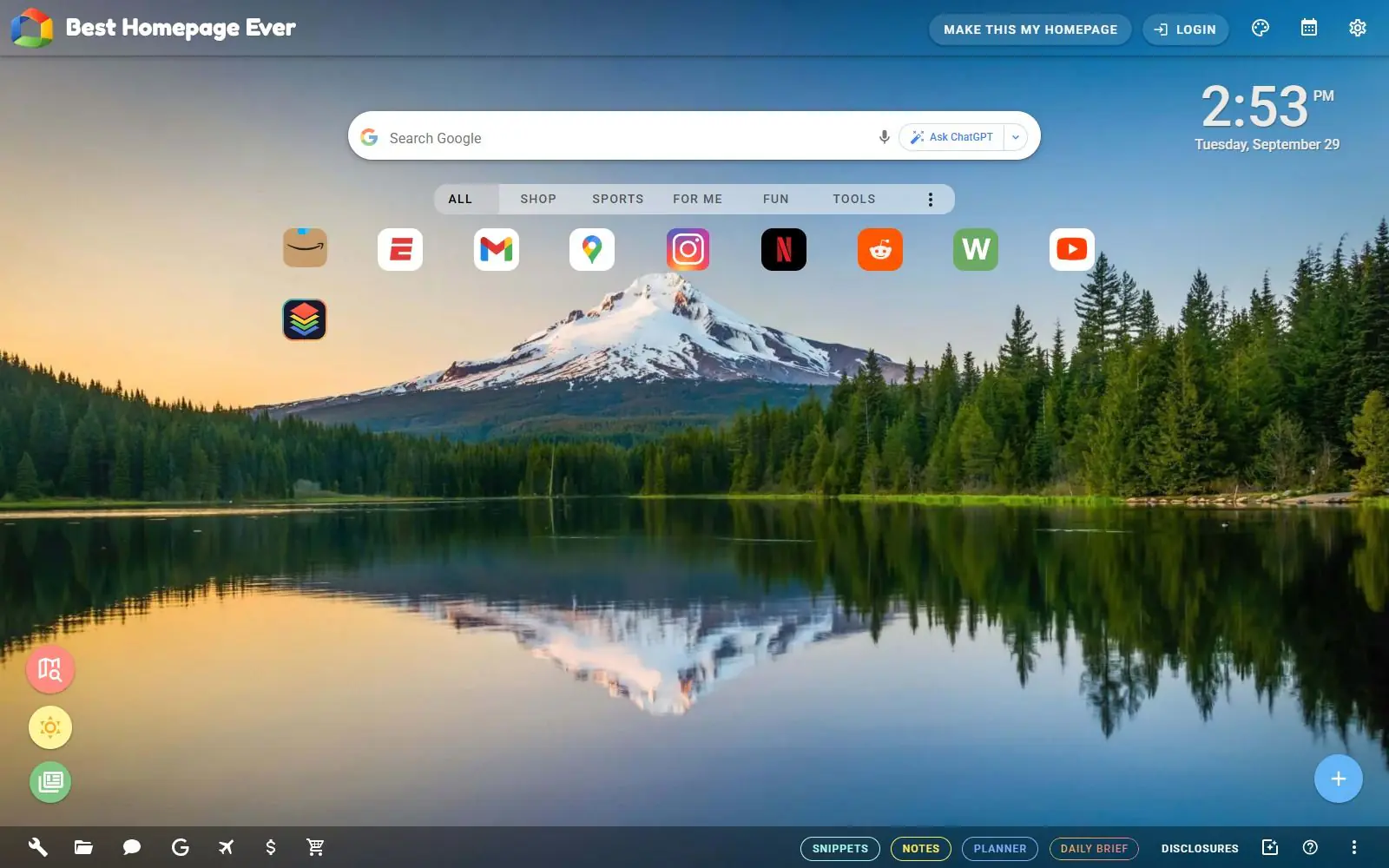
Best Homepage Ever is a free browser homepage built around shortcuts you add yourself, sorted into categories such as Shop, Sports, For Me, Fun and Tools from a blue "Add Websites" button (its own guide, read 2026-09-29). The default page also shows a clock and a search bar labeled "Ask ChatGPT" next to the ordinary search box (besthomepageever.com, read 2026-09-29). None of that needs an account.
It's run by one person as a for-profit site. Its disclosures page is written in the first person, "I use Microsoft Clarity to track user interactions on the homepage," "I am an Amazon Associates Affiliate," rather than naming a company (besthomepageever.com/disclosures, read 2026-09-29). It suits someone who wants a link launcher with a handful of built-in tools bundled in, rather than a wide grid of live widgets or a homelab status board; if that's the goal, a widget-first product like Protopage or a self-hosted dashboard is the closer fit.
Features worth knowing
Categories organize the shortcuts you add, and a toolbar sorts them further (guide, read 2026-09-29). Beyond the shortcut grid, the top navigation adds Snippets, Notes, Planner and Daily Brief tabs, and the footer links to internet tools, office documents, Google's own sites, a travel section, a shopping section and a page of live financial figures (besthomepageever.com; guide, both read 2026-09-29).
Backgrounds can be animated, and beyond the built-in image library, the site's own AI background creator generates new ones on request (guide, read 2026-09-29). Local weather for a place you set, and saved "My Places," come with a free account (besthomepageever.com, read 2026-09-29).
Three optional browser extensions, Portal, Pindrop and Tab Page, add ways to save recipes, websites, articles and videos to the homepage from wherever you're browsing, according to the site's own guide (guide, read 2026-09-29).
Getting started
Open besthomepageever.com. There's nothing to install and nothing to sign up for; the categories, clock and shortcuts all work right away. To make it your browser's actual homepage, the site's own guide gives the settings path for each browser: in Chrome, open Settings from the three-dot menu, choose On startup, then Open a specific page or set of pages, and add the address; in Firefox, open Settings from the hamburger menu, choose Home, and set Homepage and new windows to a custom URL (guide, read 2026-09-29). Signing up for a free account is optional and only needed for local weather and saved places.
Pricing (checked 2026-09-29)
Best Homepage Ever is free. There's no plan, no checkout and no paid tier anywhere on the site or in its Terms of Use. The only optional step is a free account, and that unlocks two specific things, local weather and saved "My Places," rather than sitting behind a wider paywall (besthomepageever.com; terms, both read 2026-09-29).
Limits and trade-offs
"Ad-free" is true in the narrow sense that there are no display ad units on the page, but the site isn't free of commercial interest. Its disclosures page states it participates in the Amazon Associates and eBay Partner Network affiliate programs and can "accept advertising compensation from companies that appear on Best Homepage Ever," and it uses Microsoft Clarity to record how visitors use the site (disclosures, read 2026-09-29).
It's closed source, and its Terms of Use grant only permission "to temporarily download one copy of the materials... for personal, non-commercial transitory viewing," explicitly forbidding reverse engineering or redistribution (terms, read 2026-09-29). There's no way to self-host it or audit what it does.
It's run by one person rather than a company; the site names no legal entity anywhere in its disclosures or terms, and support runs through the site's own Help page rather than a company support desk.
Alternatives
- Protopage, a widget-based start page with private, public or password-shared tabs, closer to a full personal dashboard than a shortcut homepage.
- start.me, bookmark-based with a free tier capped at 3 pages and basic widgets, carrying advertising; Personal PRO is $25 a year for unlimited pages and 39 widgets, ad-free.
- Kadaza, a directory-style start page grouping a large grid of popular sites into topics, thinner on widgets and closer to a bookmark directory with a background picker.
- MyFav.es, even more minimal: pick favorite site icons and a background, then share the URL, with nothing else on the page.
- MyKK, a single downloadable HTML file under the MIT license, also shipped as a Chrome extension with optional cloud sync; free forever, with a $3 a year Pro tier for live weather, RSS and stock quotes.
Questions people ask
What is the best homepage for Chrome and Firefox?
There is no single best pick. Best Homepage Ever's own niche is a free, ad-free page of shortcuts sorted into categories, with live weather, a clock and a background you choose or generate with AI. If you want a page built entirely from live widgets instead of shortcuts, Protopage fits that habit better; if you want a huge directory of other sites to browse rather than your own picks, Kadaza is the closer match.
What is a personalized homepage?
The word covers two different things. A portal like Yahoo or MSN personalizes by watching what you click and deciding what to show you next, without much control over what appears. A homepage like Best Homepage Ever is personal because you arrange it yourself: the shortcuts, the background and the widgets are all ones you added.
How do I set a custom home page in Chrome or Firefox?
In Chrome, open Settings from the three-dot menu, choose On startup, select Open a specific page or set of pages, then add the address. In Firefox, open Settings from the hamburger menu, choose Home, and set Homepage and new windows to a custom URL.
Sources
- besthomepageever.com, read 2026-09-29
- besthomepageever.com/guides/best-homepages-for-chrome-firefox, read 2026-09-29
- besthomepageever.com/disclosures, read 2026-09-29
- besthomepageever.com/terms, read 2026-09-29
- DashSuey product information (dashsuey.com), checked 2026-09-29
Last checked 2026-09-29.
Last checked