Write-up
MyFav.es: an icon-only start page
Minimal start page for picking favorite site icons and a background, then sharing the URL.
MyFav.es is a free start page for picking site icons and a background, with no widgets and no account needed just to look around. Here is what it can't do.
At a glance
- Type: a hosted start page for picking icons for your favorite sites, choosing a background, and setting the result as your browser's homepage (myfav.es, read 2026-10-24)
- Pricing: free to sign up; no pricing page, paid tier or upgrade prompt found anywhere on the site (myfav.es, read 2026-10-24)
- License: closed source; no license statement is published on the site (myfav.es, read 2026-10-24)
- Install: none; open myfav.es in any browser
- Platforms: web
- Links: myfav.es · Help
- Price
- $0 USD, checked (source)
Last checked
Screenshots
What it is and who it's for
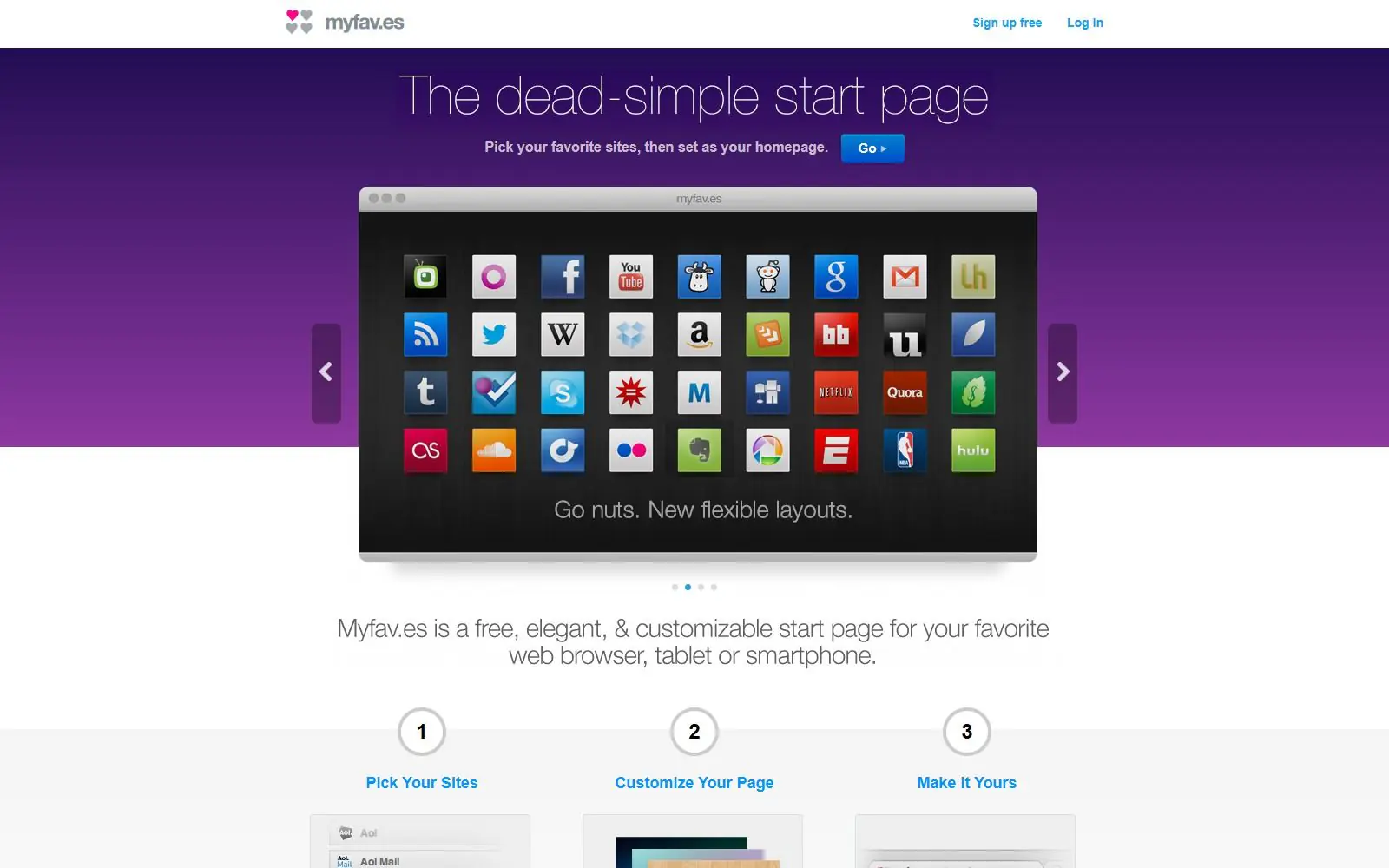
MyFav.es is a hosted start page built around one job: pick icons for the sites you visit most, arrange them on a page, and set that page as your browser's homepage. Its own homepage describes it as "a free, elegant, & customizable start page for your favorite web browser, tablet or smartphone," with a three-step pitch just as plain: "Pick Your Sites," "Customize Your Page," "Make it Yours" (source: myfav.es, read 2026-10-24).
The product is small by design, and its own sitemap confirms it: exactly three pages exist on the whole domain, the homepage, a settings page and a help page, dated 2010-05-26 (source: myfav.es/sitemap.xml, read 2026-10-24). There is no blog, no pricing page and no widget of any kind, no weather, no clock, no news feed, just icons and a background. It suits someone who wants the smallest possible replacement for a browser's blank new tab page, close to a bookmark bar turned into a homepage. It does not suit someone who wants live information on that page; MyFav.es has nothing that updates on its own.
Features worth knowing
Setup follows the three steps named on the homepage: pick icons from what its own copy calls "hundreds of beautiful icons," or upload a custom one, adjust the icon style, page layout and background, then claim a URL and set it as your homepage (myfav.es, read 2026-10-24).
The one feature with real depth is keyboard control. The help page confirms that typing 1, 2, 3 or 4, or a, s, d or f, launches the matching site, and typing c opens the configuration panel, all without touching the mouse (myfav.es/help/, read 2026-10-24). That same page answers a few practical questions: cookies need to be enabled for the page to remember your favorites, and custom icons mostly come from a third-party icon shop called Helveticons rather than being made in-house (myfav.es/help/, read 2026-10-24).
Getting started
Open myfav.es and sign up free; no further account details are described on the site itself. From there, the three-step flow, picking sites, customizing the page, and claiming a URL, sets everything up, and that address is what you point your browser's homepage setting at (myfav.es, read 2026-10-24). The help page also mentions a third-party Chrome extension and a matching Firefox add-on, both built by outside contributors, for opening MyFav.es in every new tab rather than only as the homepage (myfav.es/help/, read 2026-10-24).
Pricing (checked 2026-10-24)
MyFav.es is free. There is no pricing page, no upgrade prompt and no paid feature anywhere on the site as read today; the only call to action on the homepage is "Sign up Free" (myfav.es, read 2026-10-24).
Limits and trade-offs
The site shows real signs of age. Its sitemap file is dated 2010-05-26, sixteen years before this read, and lists only the same three pages that exist today (myfav.es/sitemap.xml, read 2026-10-24); its robots.txt address returns a plain 404 rather than an actual file (myfav.es/robots.txt, read 2026-09-28). The help page itself points visitors to a Flickr group for sharing their page and calls its own how-to video "coming soon," both signs it has gone a long time without an update.
There are no widgets. Weather, a clock, a news feed or anything else that refreshes on its own is not part of the product; it is icons and a background, and nothing more. There is also no public demo account you can enter to try the product before signing up, only a preview panel on the homepage. Trying it out past that preview means creating an account first.
Alternatives
- igHome, a directory-style start page with a large grid of city and topic gadget pages, closer to a portal than a personal icon picker.
- Kadaza, another directory-style start page grouping popular sites into topics, thinner on personalization than MyFav.es's icon picker.
- Best Homepage Ever, a free shortcut homepage with categories, a clock and live weather, more built out than MyFav.es's icons-only approach.
- Protopage, a widget-based start page with private, public or shared tabs, for someone who wants live content rather than static icons.
- CentPage, a start page with widgets and an ad-free paid tier, aimed at a similar job with a larger feature set.
Questions people ask
Does MyFav.es have keyboard shortcuts?
Yes. Typing 1, 2, 3 or 4, or a, s, d or f, launches the matching site, and typing c opens the configuration panel, all without touching the mouse.
Why isn't MyFav.es saving my favorite sites?
Its help page names one cause: check that cookies are enabled in your browser. That is the only fix it offers for favorites not sticking between visits.
Can I ask MyFav.es to add a new site icon?
Yes, its help page invites suggestions, though it asks you to check an existing list of already-requested sites first.
Sources
- myfav.es, read 2026-10-24
- myfav.es/help/, read 2026-10-24
- myfav.es/sitemap.xml, read 2026-10-24
- myfav.es/robots.txt, read 2026-09-28
- DashSuey product information (dashsuey.com), checked 2026-10-24
Last checked 2026-10-24.